

 About JapaTalk
 Japanese Teachers
 Pricing
 How to Use
 Special Lessons
 Sensei's Notes
 Zoom Guide
 Reviews
 FAQ
FAQ
 Contact us
How to Use Zoom
At JapaTalk, we use a free app called Zoom for our online lessons.

You do not need to sign up or log in to a Zoom account to take a lesson.
You can join simply by clicking the Zoom link provided after you book.
How to Join a Lesson
Install the Free Zoom App (First Time Only)
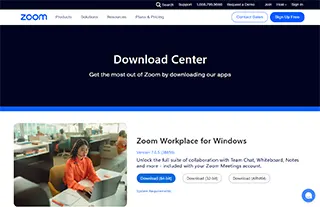
[For PC]
For the best lesson quality, we recommend installing the app. (However, it is not required; you can also join directly from your web browser.)
Download Zoom (Get the 64-bit version)
[For Smartphone & Tablet]
You must install the free Zoom app beforehand.
Book a Lesson on JapaTalk
Once you book a lesson, a Zoom link will appear on the Lesson Details page.
You will also receive this same link in your booking confirmation email.
Enter the Zoom Room
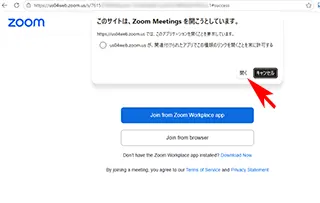
At least 1 minute before your lesson starts, click "Join Zoom" on the JapaTalk Lesson Details page, or click the link in your email.
Check your camera, microphone, and speakers to make sure they are working. When it is time for your lesson, click the "Join" button.
Note: If you are asked to enter a name, please type the exact same name you used to book your JapaTalk lesson.
Frequently Asked Questions
Do I need to sign up or log in to a Zoom account?
No, you do not. You can join the lesson just by clicking the Zoom link.
My screen says, "Please wait for the host to start this meeting." What should I do?
This means your teacher has not started the Zoom meeting yet. Please wait on that screen.
If you still cannot enter after the lesson start time has passed, please message your teacher from the JapaTalk Booking Details page.
I cannot hear the teacher, or the teacher cannot hear me.
When joining the room, please select "Join with Computer Audio" (or "Wi-Fi or Cellular Data" if you are on a smartphone).
If the microphone icon at the bottom of your screen has a diagonal line through it, you are muted. Click the icon to unmute yourself.
How do I change my display name on Zoom?
Please try to make your Zoom display name match your JapaTalk name.
You can change it by going to Settings > My Account > Edit My Profile, logging in, and clicking "Edit" next to your name.